

Q. What is material design?
Ans:- Material design is a design technique/language. It uses a grid-based layout, responsive animation, and transition, padding, depth effects show as lightning and shadow. It is designed to optimize user experience with natural motions, 3D effects, and realistic lighting.
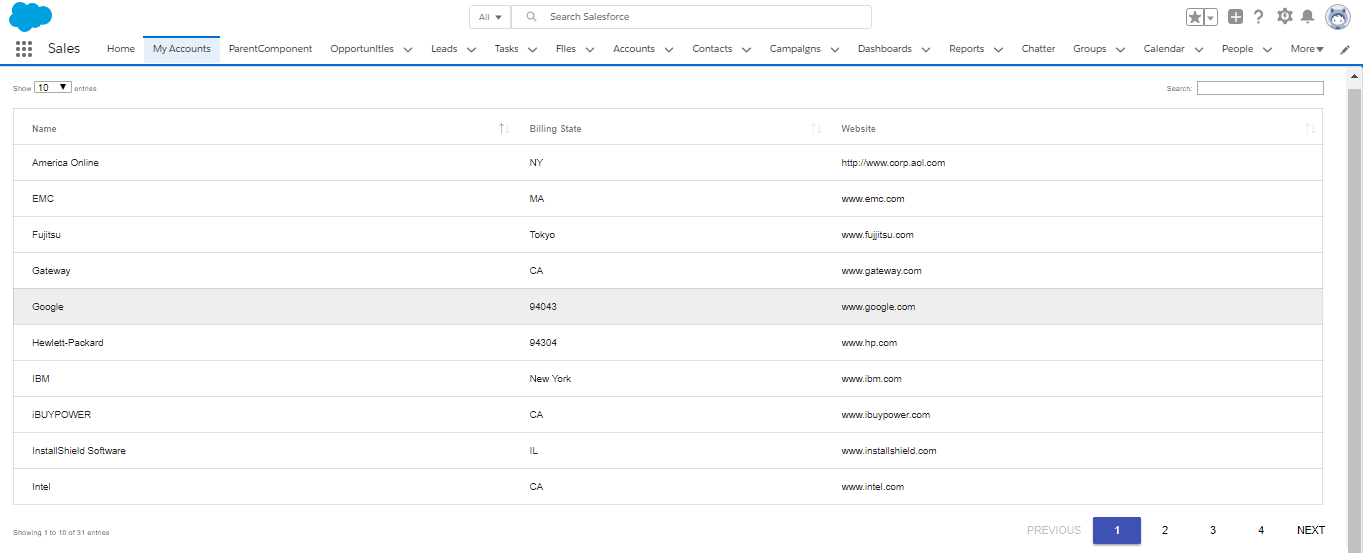
DataTable: It is a plug-in for the jQuery Javascript library. It will add features like fast search in the table, paginations, column sorting, etc with the minimum code.
In this example code, I have used DataTable (Jquery plug-in javascript library) in the visualforce page. Find the full code below.
 <apex:page controller="DatatableCntrl" sidebar="false">
 <head>
   <apex:includescript value="https://code.jquery.com/jquery-3.3.1.js"/>
   <apex:includescript value="https://cdn.datatables.net/1.10.19/js/jquery.dataTables.min.js"/>
   <apex:includescript value="https://cdn.datatables.net/1.10.19/js/dataTables.material.min.js"/>
   <apex:stylesheet value="https://cdnjs.cloudflare.com/ajax/libs/material-design-lite/1.1.0/material.min.css"/>
   <apex:stylesheet value="https://cdn.datatables.net/1.10.19/css/dataTables.material.min.css"/>

   j$ = jQuery.noConflict();
   j$(document).ready( function () {
     var accTable = j$('[id$="accTable"]').DataTable({  //datatable
        columnDefs: [
     {
       targets: [ 0, 1, 2 ],
       className: 'mdl-data-table__cell--non-numeric'
     }
   ]
     });
   });

   <style>
     div.dataTables_wrapper div.dataTables_filter {
     text-align: right;
     margin-right: 2%;
     /* border-radius: 2px; */
     /* height: 51px; */
   }
   </style>
 </head>
 <body>
   <table id="accTable" class="mdl-data-table" style="width:100%">
     <thead>
       <tr>
         <th>Name</th>
         <th>Billing State</th>
         <th>Website</th>
       </tr>
     </thead>
     <tbody>
       <apex:repeat value="{!accList}" var="acc">
         <tr>
           <td>{!acc.Name}</td>
           <td>{!acc.BillingState}</td>
           <td>{!acc.Website }</td>
         </tr>
       </apex:repeat>
     </tbody>
   </table>
 </body>
 </apex:page>
 public class DatatableCntrl{
   public List<Account> accList {get; set;}
   public DatatableCntrl(){
     accList = [SELECT Name, BillingState,Website FROM Account where BillingState!='' and Website !='' order by name ];
   }
 }
References:
