

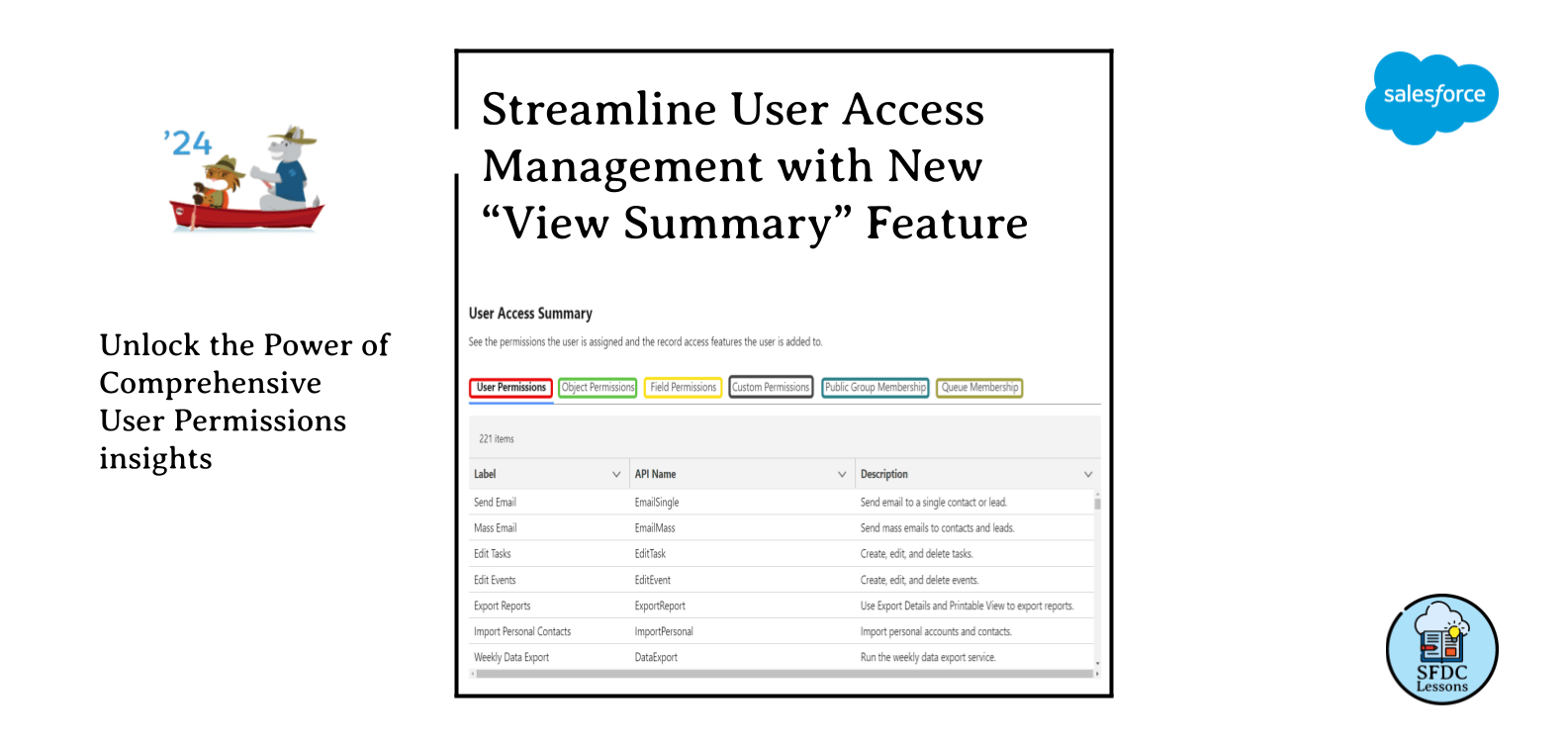
Salesforce admins, rejoice! The Summer ’24 release is introducing a game-changing new feature that will transform the way you manage and understand user permissions. Get ready to say goodbye to the days of navigating through multiple setup pages and reports to gather a complete picture of a user’s access – the new “View Summary” button is about to make your life a whole lot easier.
This functionality will allow you to quickly access a centralized summary of all permissions assigned to a specific user. With just a click, you’ll be able to see the user’s:
- User Permissions: The direct system permissions granted to the user, such as “Modify All Data” , “Manage Users”,”AuthorApex”, etc.
- Object Permissions: The level of access the user has to each standard and custom object, including create, read, edit, and delete permissions.
- Field Permissions: Visibility and editability of individual fields across objects.
- Custom Permissions: Any custom permissions the user has been granted.
- Public Group Memberships: The public groups the user is a part of.
- Queue Memberships: The queues the user is a member of.
This comprehensive view will be a game-changer for Salesforce admins, providing unparalleled visibility into a user’s access and capabilities. Gone are the days of piecing together permission information from various setup areas – it will all be neatly compiled in a single, easy-to-digest summary.
Do you want to experience this feature before Salesforce formal release?
You can try this feature if you have previously registered for Pre-Release org for Spring ’24 – it’s available there.
Streamlining Troubleshooting and Security Reviews
The “View Summary” feature isn’t just about giving admins a centralized permissions dashboard – it also promises to significantly improve troubleshooting and security management.
When users encounter issues or exhibit unexpected behaviors, admins can quickly pull up the “View Summary” to identify the specific permissions that may be contributing to the problem. This level of granular insight will make it much easier to pinpoint the root cause and implement the necessary corrections.
Similarly, the “View Summary” will be invaluable for conducting periodic user access reviews. Admins can easily audit a user’s permissions to ensure they align with their role and organizational security policies. This will help prevent the risk of over-privileged users and strengthen the overall security posture.
Empowering Admins, Enhancing Organizational Governance
The introduction of the “View Summary” button is a testament to Salesforce’s commitment to empowering its admin community. By providing this level of visibility and control, admins can now more effectively manage user permissions, identify security risks, and ensure compliance with internal policies.
This feature also supports broader organizational governance initiatives. With the ability to quickly review a user’s access, admins can better maintain control over sensitive data and critical business processes. This, in turn, can help organizations reduce the risk of data breaches, unauthorized changes, and other security incidents.
Preparing for the Summer ’24 Release
As the Salesforce Summer ’24 release approaches, Salesforce admins should start familiarizing themselves with the “View Summary” feature and incorporating it into their permission management workflows. This new capability will undoubtedly become an essential tool in the admin’s arsenal, streamlining day-to-day tasks and strengthening the overall security and governance of the Salesforce environment.
So, get ready to bid farewell to the days of scattered permission information and hello to the power of the “View Summary” button. With this game-changing feature, Salesforce admins can look forward to a future of enhanced visibility, improved troubleshooting, and more effective user access management.
About the blog
SFDCLessons is a blog where you can find various Salesforce tutorials and tips that we have written to help beginners and experienced developers alike. we also share my experience and knowledge on Salesforce best practices, troubleshooting, and optimization. Don’t forget to follow us on:
Newsletter
Subscribe to our email newsletter to be notified when a new post is published.
